
How To Place Phone Holder In Car: Easy Setup Guide
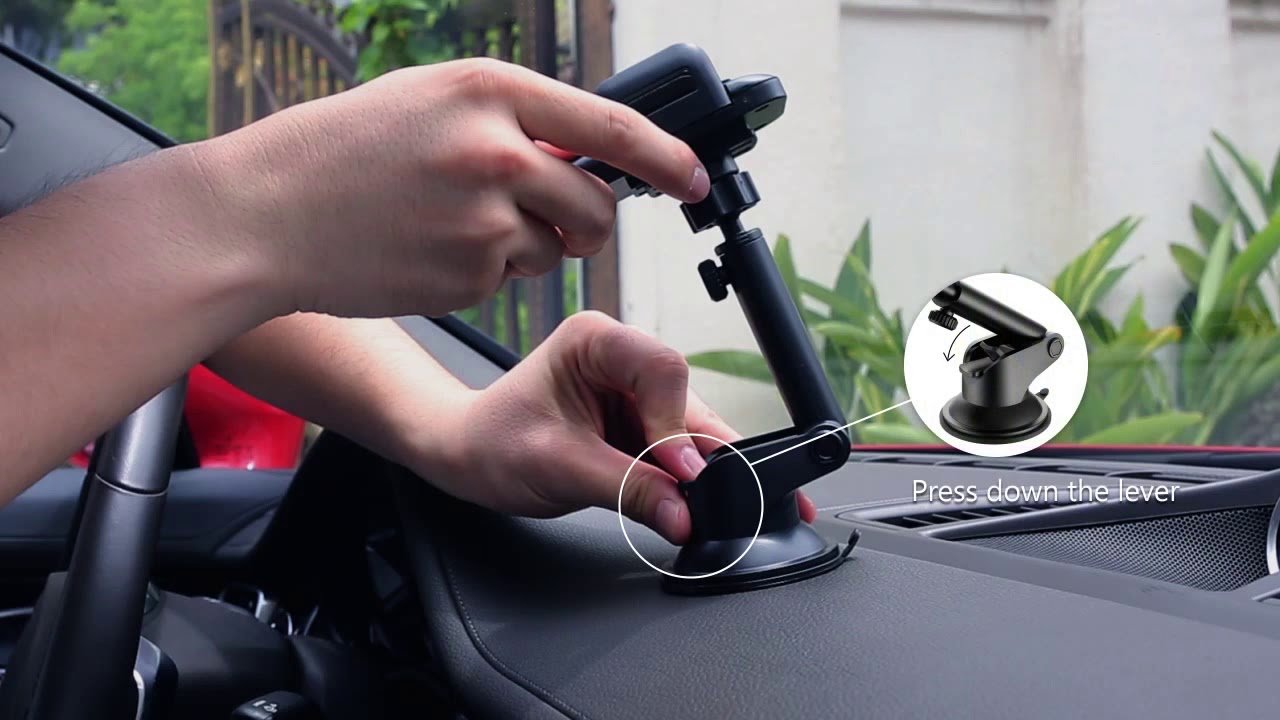
Place the phone holder where it stays secure, easy to see, and outside your view of the road.
Learning how to place phone holder in car is not only about finding a convenient spot. The right position can improve navigation, reduce distractions, protect your phone, and help you keep both hands ready for driving. This guide explains the best mounting areas, setup steps, common mistakes, and safety tips for different car interiors and phone holder types.

Choose the Best Location for Your Phone Holder
The best phone holder position depends on your car, driving style, phone size, and holder design. A good location should meet three basic needs: it must hold the phone firmly, keep the screen visible, and avoid blocking your view.
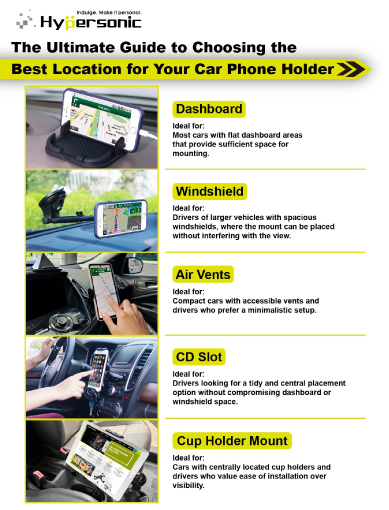
When deciding how to place phone holder in car, check these areas first:
• Dashboard: A dashboard mount is easy to see and often gives the clearest view of navigation.
• Air vent: A vent mount is simple to install and removes easily, but it may block airflow or become loose on weak vents.
• Windshield: A suction mount can offer strong visibility, but it must not block your view of traffic.
• CD slot: A CD slot holder sits near the center of the dash and often gives a stable viewing angle.
• Cup holder: A cup holder mount keeps the phone low and stable, but it may require you to look down more often.
The safest position is usually near the center of the dashboard, slightly below eye level. Avoid placing the phone directly in front of the steering wheel, over an airbag cover, or in a spot that hides mirrors, signals, or road signs.
How to Place Phone Holder in Car Step by Step
A careful setup takes only a few minutes. Rushing the process can lead to a loose mount, a falling phone, or a poor viewing angle.
1. Clean the mounting surface
Use a dry microfiber cloth to remove dust, oil, and dirt. For a suction mount, clean glass or plastic helps create a better seal. For an adhesive dashboard mount, follow the product instructions and let the surface dry fully.
Do not apply adhesive to a textured, dusty, or greasy area. The mount may look secure at first but can fall during a sharp turn or sudden stop.
2. Test the position before attaching it
Sit in the driver’s seat and hold the phone holder in several possible locations. Check whether you can see the screen with a quick glance while still seeing the road ahead.
This step is central to how to place phone holder in car correctly. The holder should support a short glance, not invite you to read messages or watch content while driving.
3. Attach the holder firmly
Follow the correct method for your holder type:
-
Press a suction cup firmly against smooth glass or a clean dashboard surface.
-
Lock the suction lever if the mount has one.
-
Insert a vent clip fully into a strong, straight air vent.
-
Tighten the CD slot screw gently until the mount feels stable.
-
Press an adhesive base evenly against the dashboard.
Avoid overtightening screws or clips. Too much pressure can damage a vent, dashboard trim, or the holder itself.
4. Adjust the viewing angle
Tilt the phone toward your face, but do not point it directly into sunlight. A slight angle can reduce glare and make map directions easier to see.
Keep the phone close enough for visibility but far enough away that it does not interfere with controls. You should still be able to reach the climate controls, hazard button, and gear selector without hitting the holder.
5. Secure the phone and test the mount
Place the phone in the holder and check that the side arms or cradle grip it firmly. Test the mount by gently pressing the phone from different directions.
Drive around a quiet area before using the holder on a highway. Listen for rattles and check whether the phone moves over bumps. This simple test often reveals a weak clip or poor angle before it becomes a safety problem.

Best Phone Holder Position for Different Car Types
Every vehicle has a different dashboard shape. A position that works in a compact sedan may be unsafe or uncomfortable in a truck, SUV, or sports car.
Sedans and compact cars
Small cars often have limited dashboard space. A center dash mount, vent mount, or CD slot holder may work well.
Keep the phone away from the passenger airbag area. Many dashboards have an airbag label or a visible seam. Never attach a phone holder over that area.
SUVs and trucks
SUVs and trucks usually have larger dashboards, but the seating position can be higher. A low mount may force you to look down too far.
A dashboard mount near the center may provide the best balance. If the windshield is large, place a suction mount low and to the side, outside the main viewing area.
Cars with curved dashboards
Curved or soft-touch dashboards can be difficult for suction cups and adhesive bases. In this case, consider a vent mount, CD slot mount, or a holder made for curved surfaces.
Do not force a flat adhesive base onto a sharply curved area. It may peel away when the interior becomes hot.
Cars with small or weak air vents
Some vents cannot support the weight of a large phone. Horizontal vents with flexible slats may bend or close when a heavy holder is attached.
A suction, dashboard, or cup holder mount may be a better choice. The safest answer to how to place phone holder in car depends on the strength of the mounting point, not just its convenience.
How to Place Different Types of Car Phone Holders
Phone holders use different attachment systems. Each one has clear benefits and limits.
Dashboard phone holder
A dashboard holder is a popular choice because it keeps the screen near the driver’s natural line of sight.
To install one:
• Choose a flat area with a clear view.
• Clean the surface.
• Attach the base or suction cup.
• Press or lock the mount firmly.
• Adjust the arm so the phone does not cover the road.
Dashboard mounts may leave adhesive marks or become weak in extreme heat. Check the mount often during hot summer months.
Air vent phone holder
Vent holders are quick to install and easy to remove. They work best on strong vents that do not move loosely.
Insert the clip between the vent slats without forcing it. Make sure the phone does not block airflow completely, especially when using heat or air conditioning for long periods.
A heavy phone can cause the vent to sag. If the vent moves when you touch the holder, choose another mounting location.
Windshield suction holder
Suction mounts can be stable when attached to clean, smooth glass. Place the holder low on the windshield and outside your central view.
Many regions regulate windshield-mounted objects. Rules vary by state and city, so check local traffic laws before using this type of mount. Even when legal, a windshield mount should never block your view.
CD slot phone holder
A CD slot mount fits into the unused disc player. It can place the phone near the center of the dashboard without using adhesive.
Insert the holder gently and tighten it only until it feels secure. Avoid using this type if the CD slot is part of a delicate mechanism or if the holder blocks important controls.
Cup holder phone mount
A cup holder mount is useful when the dashboard and vents are unsuitable. It usually has an adjustable base that expands inside the cup holder.
Choose a cup holder that does not interfere with the gear selector, parking brake, or storage space. The phone may sit lower, so use voice directions whenever possible.

Safety Rules for Mounting a Phone in a Car
A phone holder can reduce the need to hold your phone, but it does not make texting or browsing safe. Distracted driving remains dangerous, even when the device is mounted.
Follow these safety rules:
• Set your route before moving.
• Use voice commands when possible.
• Turn on Do Not Disturb or driving mode.
• Stop in a safe place before typing.
• Keep the screen simple and easy to read.
• Never mount the phone over an airbag.
• Keep cables away from the steering wheel and pedals.
• Do not let the holder block mirrors, warning lights, or road signs.
Safety agencies generally recommend limiting visual, manual, and mental distractions while driving. A mounted phone helps with hand control, but it cannot remove all distraction.
Modern vehicles also have airbags in steering wheels, dashboards, side panels, and sometimes pillars. Because airbag deployment is extremely fast and powerful, a phone holder or phone should never be placed where it could become a projectile.
Common Mistakes to Avoid
Many installation problems come from choosing a convenient location instead of a safe one.
Mounting on a dirty surface
Dust and oil reduce suction and weaken adhesive. Clean the area before installation and allow it to dry.
Blocking the driver’s view
A phone should not sit in the center of the windshield at eye level. Even a small blocked area can hide a pedestrian, cyclist, or vehicle.
Choosing a weak air vent
Thin vent slats may not support a heavy phone. A mount that moves while the car is parked may become dangerous on rough roads.
Installing near an airbag
Never place a holder on the steering wheel, dashboard airbag cover, or side airbag area. Check the vehicle manual if you are unsure where airbags are located.
Ignoring heat
Cars can become very hot inside. Heat may weaken adhesive, damage battery health, or soften plastic parts.
Avoid leaving the phone in direct sunlight. If the device becomes hot, remove it from the holder when parked and let it cool.
Using a poor viewing angle
A screen that reflects sunlight or sits too low can encourage long glances. Adjust it before driving and use audio guidance when possible.
Forgetting the charging cable
A cable that hangs near the gear lever or steering wheel can catch your hand. Route it along the dashboard and secure extra length away from moving parts.

How to Keep the Phone Holder Secure
A secure mount needs occasional care. Check it at least once a month, and inspect it more often if you drive on rough roads.
Look for these warning signs:
• The suction cup has a visible gap.
• The adhesive base is lifting.
• The vent clip is pulling the slats downward.
• The phone shakes during normal driving.
• The adjustment joint will not stay tight.
• The cradle arms no longer grip the phone.
If you notice any of these problems, remove the holder and reinstall it. Do not wait for the phone to fall while driving.
A useful real-world lesson is to test the mount with the phone inside before trusting it on a long trip. A holder may feel solid when empty but move when it carries a large phone with a case. Heavy phones often need a stronger base and shorter adjustable arm.
Phone Holder Tips for Long Trips
Long drives place more stress on a phone mount. Vibration, heat, charging cables, and repeated adjustments can slowly loosen the setup.
Before a road trip:
-
Clean the mount and attachment surface.
-
Charge the phone and set the route.
-
Check that the holder fits the phone with its case on.
-
Secure the charging cable.
-
Test the holder on a short drive.
-
Pack a backup charging cable or power adapter.
-
Keep a safe place to pull over if you need to change the route.
If the phone overheats, stop when safe and remove it from direct sunlight. Navigation may pause or shut down when a device becomes too hot.
How to Choose the Right Car Phone Holder
The best holder is not always the most expensive one. Choose based on your car’s design and your daily needs.
Consider these features:
• Strong attachment: The base should match the surface where you plan to install it.
• Adjustable viewing angle: This helps reduce glare.
• One-hand or magnetic access: Useful when parked, but avoid adjusting the phone while moving.
• Case compatibility: Confirm that the cradle fits your phone with its case.
• Wireless charging: Convenient, but it can create extra heat and may not fit every phone.
• Stable support arm: Shorter arms usually shake less than long, flexible arms.
• Easy removal: A removable mount helps when you change vehicles or need to clean the dashboard.
Magnetic holders are convenient, but the magnet must be strong enough for the phone and case. Wireless charging holders may also require correct alignment between the phone and charging coil.
What to Do If the Phone Holder Keeps Falling
A falling holder usually points to a poor surface, weak attachment method, excess weight, or extreme temperature.
Try these steps:
• Clean the surface with a microfiber cloth.
• Move the holder to a smoother area.
• Replace an old suction cup.
• Use a support pad designed for dashboard mounts.
• Remove a heavy phone case if it causes poor balance.
• Shorten the holder’s arm.
• Choose a different mount style.
If an adhesive mount fails, do not simply press it back into place. Replace the adhesive pad or use a new base. Reusing weak adhesive may cause the phone to fall during braking.
Frequently Asked Questions About How to Place Phone Holder in Car
Where is the safest place to put a phone holder in a car?
The safest place is usually near the center of the dashboard, slightly below eye level, where it does not block the road or cover an airbag. The exact location depends on your vehicle’s dashboard design and local laws.
Can I put a phone holder on my windshield?
You can use a windshield holder only where it is legal and where it does not block your view. Place it low and to the side rather than in the center of the windshield.
Is an air vent phone holder safe?
An air vent phone holder can be safe when attached to a strong vent that does not sag or move. Avoid using one on weak, thin, or highly flexible vent slats.
Should the phone holder be on the left or right side?
The holder can sit on either side if it remains easy to see without blocking mirrors or the road. Many drivers prefer the center or lower left side, but comfort and visibility should guide the choice.
Can a phone holder damage my car?
Some holders can leave adhesive residue, scratch trim, weaken vent slats, or mark soft dashboard materials. Use the mounting method recommended for your interior and remove it carefully.
How high should a car phone holder be?
Keep it close to eye level but below the main line of sight through the windshield. You should be able to glance at navigation briefly without moving your head far from the road.
Can I use a phone holder over an airbag?
No. Never place a phone holder on a steering wheel, dashboard airbag cover, or any marked airbag area. A deployed airbag can turn the holder or phone into a dangerous projectile.
Conclusion
Knowing how to place phone holder in car means more than attaching it to the nearest surface. Choose a firm location, keep the phone out of your main view, avoid airbags, test the mount, and secure the charging cable.
A dashboard, vent, windshield, CD slot, or cup holder mount can work well when matched to the right vehicle. Take a few minutes to check the fit before driving, and use voice controls whenever possible. Choose your safest mounting position today, then share your setup or explore more vehicle safety guides for practical driving tips.